How to Set Up an Affiliate Program with Stripe: Step-by-Step Guide
A detailed walkthrough of building a Stripe-powered affiliate program — from Stripe Connect setup and webhook configuration to automated commission tracking and payouts.
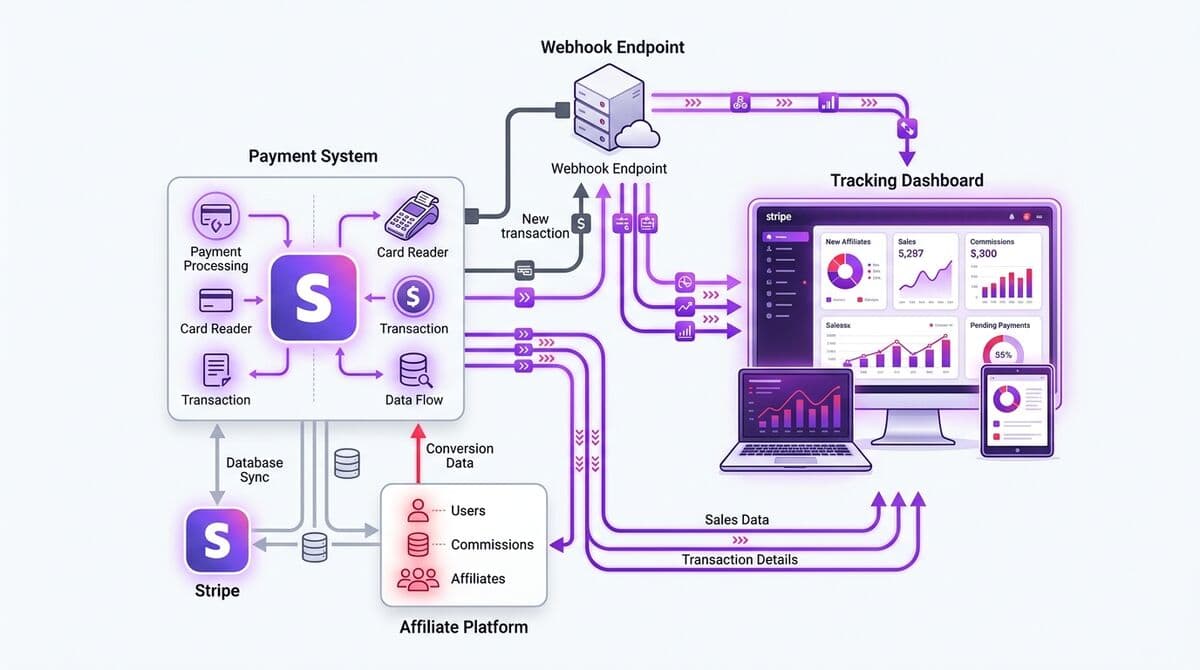
Why Stripe Is Ideal for SaaS Affiliate Programs
Stripe has become the default payment processor for SaaS companies, and for good reason. Its subscription billing infrastructure, comprehensive webhook system, and Stripe Connect platform make it the most capable foundation for building an affiliate program. Over 80% of SaaS companies launched in the last five years use Stripe as their primary payment processor.
For affiliate tracking specifically, Stripe offers several advantages. Its webhook system fires reliable, real-time events for every payment lifecycle action — subscription creation, invoice payment, plan changes, cancellations, and refunds. These webhooks provide the authoritative payment data that server-side affiliate tracking depends on.
Stripe Connect, Stripe's platform for facilitating payments to third parties, provides the infrastructure for automated affiliate payouts. Instead of manually calculating commissions and sending bank transfers, you can use Connect to automatically route commission payments to affiliate bank accounts. This eliminates hours of monthly manual work and reduces payout errors to zero.
The combination of Stripe's billing webhooks (for conversion tracking) and Stripe Connect (for payouts) creates an end-to-end system where affiliate commissions are tracked, calculated, and paid entirely through Stripe's infrastructure — with your affiliate tracking platform orchestrating the process.
Setting Up Stripe Connect for Affiliate Payouts
OAuth Connect
One-click Stripe authorization
Webhooks Auto-Configured
invoice.paid, subscription.*, charge.*
Conversions Tracked
Every payment matched to referrer
Payouts via Connect
Automated transfers, 0% fees
Stripe Connect comes in three flavors: Standard, Express, and Custom. For affiliate programs, Express is the right choice. Here is why and how to set it up:
Why Express (not Standard or Custom): Express accounts give you control over the payout experience while Stripe handles identity verification, tax reporting, and compliance. Standard accounts redirect affiliates to Stripe's full dashboard (confusing for non-technical users). Custom accounts require you to build the entire onboarding and identity verification flow yourself (expensive and complex). Express is the sweet spot.
Step 1 — Enable Connect in Your Stripe Dashboard: Go to Settings → Connect in your Stripe Dashboard. Enable Express accounts and configure your branding (logo, colors, support email). This branding appears on the affiliate onboarding flow.
Step 2 — Configure the OAuth Flow: When an affiliate wants to connect their bank account, you redirect them to Stripe's OAuth flow. Stripe handles identity verification, bank account collection, and compliance checks. You receive back an account_id that you store alongside the affiliate record in your database.
Step 3 — Set Up Payout Schedules: Configure the payout timing — daily, weekly, or monthly. Most affiliate programs use monthly payouts with a 30-day holding period to account for refunds and chargebacks.
With Icodrip, this entire Stripe Connect setup is handled automatically. When an affiliate clicks "Connect Bank Account" in their portal, we initiate the Stripe Connect Express OAuth flow, process the callback, and store the connected account. No custom code required.
Configuring Webhooks for Conversion Tracking
Stripe Webhook Integration Flow
invoice.paid
customer_id, amount, subscription_id
Receive & Verify
Validate webhook signature (whsec_...)
Match Referral
customer → referral_code → affiliate
Calculate Commission
amount × rate = commission (in cents)
Stripe webhooks are the backbone of server-side affiliate tracking. Here are the webhook events you need to listen for and what each one means for your affiliate program:
checkout.session.completed: Fired when a customer completes a Checkout session. This is typically your initial conversion event — the moment a referred visitor becomes a paying customer. Extract thecustomerID and match it to your stored referral attribution.invoice.paid: Fired when an invoice is successfully paid. For subscription businesses, this fires on every renewal. Use this event to calculate recurring commissions for each billing cycle.customer.subscription.updated: Fired when a subscription changes — plan upgrades, downgrades, quantity changes. Use this to adjust future commission calculations based on the new subscription amount.customer.subscription.deleted: Fired when a subscription is cancelled. Stop calculating future commissions for this customer.charge.refunded: Fired when a payment is refunded. Create a negative commission entry (clawback) for the affected payout period.charge.dispute.created: Fired when a chargeback is initiated. Flag the commission for review and consider clawback.
Each webhook must be verified using Stripe's signature verification to ensure the request is genuinely from Stripe and has not been tampered with. Always use the stripe-signature header and your webhook signing secret to verify each request before processing.
Critical: webhook processing must be idempotent. Stripe may send the same event multiple times (retries on failure). Your handler must check the event ID and skip processing if the event has already been handled. Without idempotency, you risk double-counting commissions.
Tracking Subscriptions and Calculating Commissions
Commission Calculator
Sale Price
$149
/month
Commission Rate
30%
percentage
Commission
$44.70
/month recurring
Once your webhooks are configured, you need logic to connect Stripe events to affiliate commissions. Here is how the tracking flow works end-to-end:
The Customer Journey:
- Visitor clicks affiliate link → click recorded with referral code
- Visitor signs up for your product → referral code stored in user record
- Visitor starts a free trial → no commission yet (no payment)
- Trial converts to paid subscription → Stripe fires
checkout.session.completed - Your webhook handler matches the Stripe customer ID to the user record, finds the referral code, and looks up the corresponding affiliate
- Commission is calculated:
invoice_amount × commission_rate - Commission is recorded with status "pending" (enters the holding period)
On Each Renewal:
- Stripe processes the renewal → fires
invoice.paid - Your webhook handler identifies the customer, finds the affiliate attribution
- Checks if recurring commissions are still active (within the time limit)
- Calculates and records the commission
Commission amounts should always be calculated in cents (integers) to avoid floating-point rounding errors. A 25% commission on a $49.00 (4900 cents) charge is 1225 cents ($12.25), not a floating-point multiplication of 49.00 × 0.25. This is particularly important for high-volume programs where rounding errors can accumulate.
Icodrip handles all of this commission logic automatically when you connect your Stripe account. The platform processes every webhook event, calculates commissions according to your program rules, and manages the full lifecycle including clawbacks.
Handling Refunds and Chargebacks
"type": "invoice.paid",
"customer": "cus_Qk8x...",
"amount_paid": 14900,
"currency": "usd",
"metadata": {
"ref_code": "partner_sarah"
}
}
Refunds and chargebacks are a normal part of running a subscription business, and your affiliate program must handle them gracefully to prevent commission overpayment:
Full Refunds: When a customer receives a full refund (Stripe fires charge.refunded), the corresponding affiliate commission should be clawed back entirely. Create a negative commission entry in the same payout period if the commission has not yet been paid out, or deduct it from future earnings if it has already been disbursed.
Partial Refunds: For partial refunds, calculate the proportional commission reduction. If the customer was refunded 50% of the charge, reduce the commission by 50%. This requires storing the original charge amount alongside each commission record.
Chargebacks: Treat chargebacks like refunds for commission purposes. When charge.dispute.created fires, flag the commission as disputed. If the dispute is resolved in the customer's favor (charge.dispute.closed with status lost), clawback the commission. If resolved in your favor (won), release the hold.
Holding Periods: The primary defense against refund-based commission overpayment is a holding period. Most programs hold commissions for 30-60 days before they become payable. This window covers the majority of refund requests and chargeback notifications. Stripe's refund window is 180 days, so you may want a longer holding period for high-risk programs.
Communicate your refund and clawback policy clearly in your affiliate terms of service. Affiliates understand and accept commission adjustments for refunds — what they do not accept is surprises. Transparency builds trust.
Automated Payouts and Tax Compliance
With Stripe Connect Express accounts set up for your affiliates, payout automation becomes straightforward:
Automated Payout Flow:
- Commissions accumulate in the affiliate's balance as their referred customers pay
- After the holding period (e.g., 30 days), commissions become "payable"
- On your payout schedule (e.g., the 1st of each month), the platform creates a Transfer to the affiliate's Stripe Connect account
- Stripe routes the funds to the affiliate's connected bank account
- The affiliate receives payment in 2-3 business days (depending on their country)
Tax Compliance:
- US Affiliates: Collect W-9 forms before the first payout. Stripe Connect can handle this during onboarding. Issue 1099-NEC forms for affiliates earning $600+ in a calendar year. Stripe Connect's tax reporting features can generate these forms automatically.
- International Affiliates: Collect W-8BEN forms for non-US persons. Tax withholding requirements vary by country and treaty status. Stripe Connect handles much of this complexity.
With Icodrip's automated payout system, the entire process — from commission calculation to bank transfer to tax documentation — is handled without manual intervention. You can set minimum payout thresholds, configure schedules, and monitor all payouts from a single dashboard. And with 0% payout fees, every dollar of commission goes directly to your affiliates.
Testing Your Stripe Integration
Before going live, thoroughly test every aspect of your Stripe affiliate integration:
- Use Stripe Test Mode: All development and testing should happen in Stripe's test mode. Use test card numbers (4242 4242 4242 4242) to simulate payments without real money.
- Test the Full Conversion Flow: Create a test affiliate, generate a referral link, click it, sign up as a new user, and complete a test purchase. Verify that the click was tracked, the conversion was attributed, and the commission was calculated correctly.
- Test Webhook Reliability: Use Stripe's CLI (
stripe listen) to forward webhook events to your local development environment. Trigger each event type and verify your handlers process them correctly. - Test Edge Cases: Simulate a refund and verify the commission clawback. Simulate a plan upgrade and verify the commission adjustment. Simulate a cancelled subscription and verify commissions stop. Send duplicate webhook events and verify idempotency.
- Test Payouts: In test mode, simulate a payout cycle. Verify the correct commission amounts are transferred to the affiliate's test Connect account.
- Test Error Handling: What happens if a webhook fails to process? Verify your retry logic. What if the customer ID does not match any referral? Verify the event is logged but does not cause errors.
Only go live after every test scenario passes consistently. Affiliate commission errors — especially underpayments — damage trust quickly and are difficult to recover from. If you are using Icodrip, our platform handles the Stripe integration end-to-end, but we still recommend running through the test flow to verify your specific configuration.
Frequently Asked Questions
Related Articles
Automating Affiliate Payouts: Save Hours Every Month
Learn how to automate affiliate commission payouts using Stripe Connect — from setting thresholds and schedules to handling tax compliance and international payments.
SaaS GrowthRecurring Commissions for SaaS: How to Keep Affiliates Motivated Long-Term
Learn how recurring commissions work for SaaS affiliate programs, how to handle upgrades, downgrades, and churn, and why recurring payouts drive superior affiliate performance.
Ready to launch your affiliate program?
Start tracking referrals in 2 minutes. Free plan available.
Start Free